
Magnavox TV Remote Controller - Google Play
You'll be able to see results in few seconds.
Publisher Description


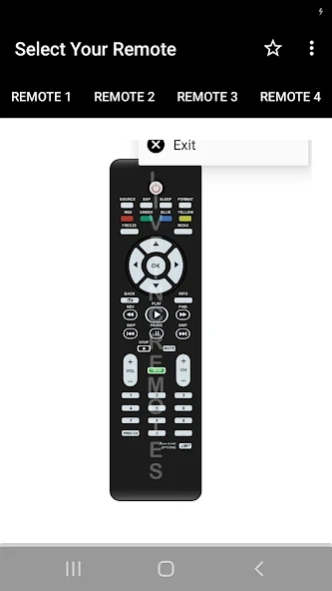

Control Your Magnavox TV With The Magnavox TV Remote Controller App!
Magnavox TV Remote Control App - Control Your TV From Your Phone!Magnavox TV Remote Control App helps turn your Android phone into a simple remote control for supported Magnavox TV models. It is useful when your physical remote is missing, broken, or not nearby.
Magnavox Remote Controller App gives users a familiar remote-style layout with quick access and easy controls. The app is designed to be simple, fast, and ready to use without a complicated setup.
Remote Control Features:
📺Magnavox TV Remote Control App - Designed to work with supported Magnavox TV models;
📱Magnavox Remote Controller App - Use a clean remote-style screen from your Android phone;
⚡No Installation Setup - Open the app, choose your remote, and start using it;
🎨Simple Interface - Enjoy a clean design made for quick control;
🇮🇳Made In India - Built as a practical remote control tool;
📩Missing Remote Support - Request a remote model from inside the app if needed;
Open the app, check IR support, and start controlling your TV!
Magnavox TV Remote Control App requires your phone to have an infrared sensor. If you are not sure whether your device supports IR, you can try the app and check if it works with your TV.
Magnavox Remote Controller App is helpful when you want a lightweight remote option with a clear design. It gives you a quick way to control supported devices without extra hardware when IR is available.
Simple Use Flow:
📲Open Magnavox TV Remote Control App on your phone;
📡Make sure your device has an infrared sensor;
📺Choose the supported Magnavox TV remote option;
🔘Use the remote buttons from the app screen;
⚡Try click-and-play control without complex setup;
📩Ask for your missing remote model from inside the app;
✅Keep Magnavox Remote Controller App ready when your physical remote is not available;
📡Infrared Remote Support:
Magnavox TV Remote Control App works through IR-based control, so phone compatibility matters. The app is best for Android devices that include an infrared sensor. If your phone does not have IR hardware, remote control features may not work as expected.
🎨Easy Interface For Daily Use:
Magnavox Remote Controller App focuses on a simple user experience with a clean button layout. The design is made to feel quick and familiar, so users can open the app and control supported TVs with fewer steps.
📩Helpful When Your Remote Is Missing:
Magnavox TV Remote Control App can be useful when the physical remote is lost or unavailable. If your specific remote is not listed, the app allows you to request it from inside the interface. This makes it easier to find support for the model you need.
Keep A Backup Remote On Your Android Phone!
Magnavox Remote Controller App gives you a practical way to control supported Magnavox TVs from a phone with IR support. With a simple layout, quick access, click-and-play use, and missing remote request support, the app is a handy backup for everyday viewing.
Disclaimer
All product names, logos, brands, trademarks and registered trademarks, which are not owned by us, are property of their respective owners.
All company, product and service names used in this app are for identification purposes only. Use of these names, trademarks and brands does not imply endorsement.
This app is owned by us. We are not affiliated, associated, authorized, endorsed by, or in any way officially connected with any 3rd party apps or companies.
**** IMPORTANT ****
This app needs your phone to have an Infrared sensor
About Magnavox TV Remote Controller
The company that develops Magnavox TV Remote Controller is Firehawk. The latest version released by its developer is 1.0 .
To install Magnavox TV Remote Controller on your Android device, just click the green Continue To App button above to start the installation process. The app is listed on our website since 2026-08-05 and was downloaded 0 times. We have already checked if the download link is safe, however for your own protection we recommend that you scan the downloaded app with your antivirus. Your antivirus may detect the Magnavox TV Remote Controller as malware as malware if the download link to in.gaffarmart.www.digitellyremote is broken.
How to install Magnavox TV Remote Controller on your Android device:
- Click on the Continue To App button on our website. This will redirect you to Google Play.
- Once the Magnavox TV Remote Controller is shown in the Google Play listing of your Android device, you can start its download and installation. Tap on the Install button located below the search bar and to the right of the app icon.
- A pop-up window with the permissions required by Magnavox TV Remote Controller will be shown. Click on Accept to continue the process.
- Magnavox TV Remote Controller will be downloaded onto your device, displaying a progress. Once the download completes, the installation will start and you'll get a notification after the installation is finished.
Program Details
System requirements
Download information
Pricing
Version History
version
posted on 2026-08-05
version 10.80
posted on 2026-08-05
New Remotes Added
High-Definition Graphics
Support 100+ Languages
UI Improvements
Many More....
Disclaimer
Official Google Play Link
We do not host Magnavox TV Remote Controller on our servers. We did not scan it for viruses, adware, spyware or other type of malware. This app is hosted by Google and passed their terms and conditions to be listed there. We recommend caution when installing it.
The Google Play link for Magnavox TV Remote Controller is provided to you by apps112.com without any warranties, representations or guarantees of any kind, so access it at your own risk.
If you have questions regarding this particular app contact the publisher directly. For questions about the functionalities of apps112.com contact us.
